Context-aware headings in HTML
posted on
A common issue that we've probably all faced at some point is having a component that includes a heading, which sometimes should be an H2 and sometimes maybe an H3, depending on where it's used.
You can see an example of that in the screenshot below, taken from the City of Vienna's website (I translated the page into English before taking the screenshot). We see the same card component used three times. At the very beginning of the page, it follows the H1, so the heading inside the first card should be an H2. But then we have another section that starts with an H2, and here these cards should start with an H3.
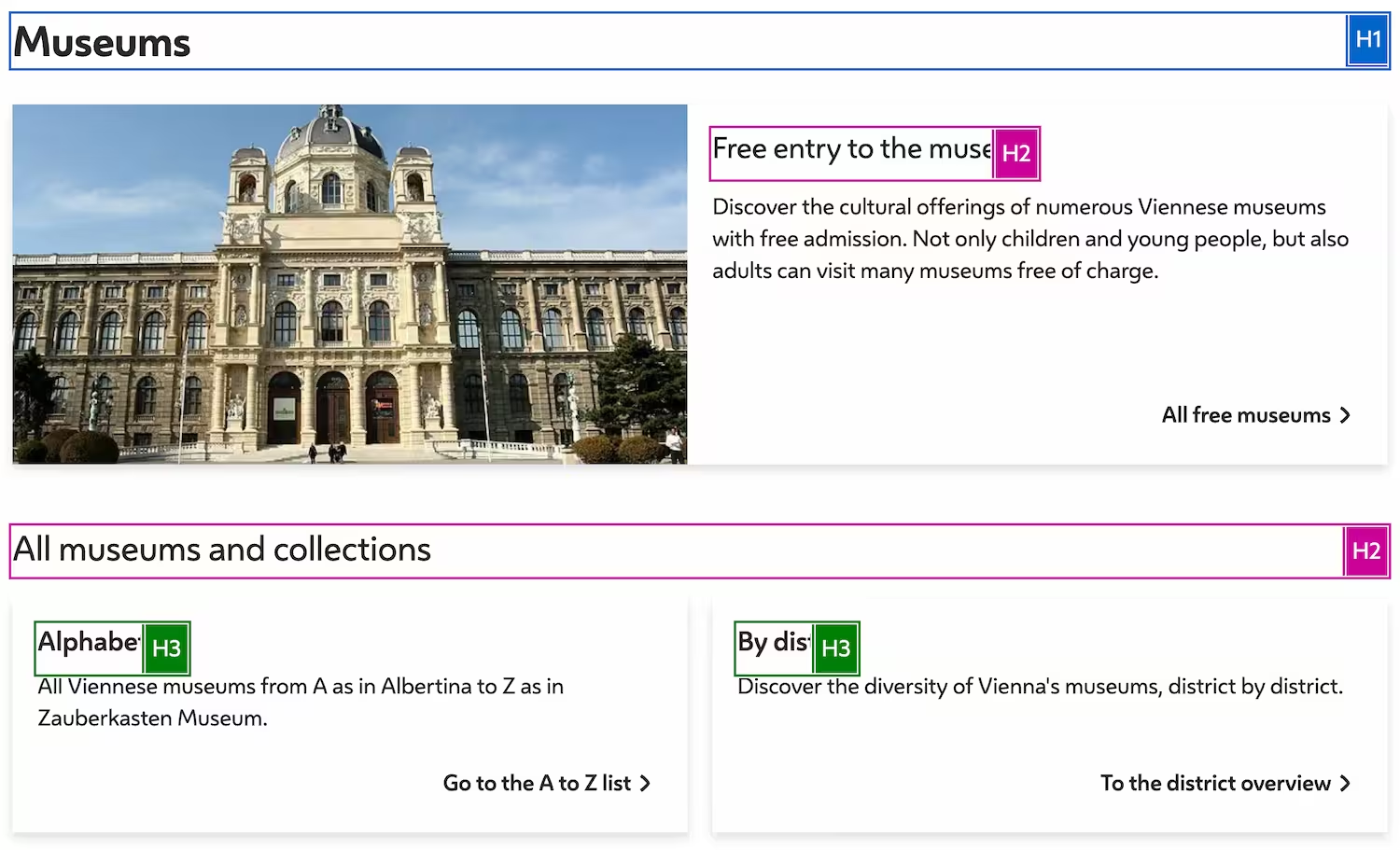
We solved this by giving editors an option to pick the appropriate heading level in the CMS. That works, but it means more work for them, because they need to keep track of the document outline, and it's also a potential source of error.
The headingoffset attribute
Yesterday, I heard about a new experimental attribute that offers a better solution to this problem. The heading offset content attribute allows us to offset heading levels for descendants.
Let's take the outline from the page in the screenshot and see how we can make it more context-aware.
<h1>Museums</h1>
<section>
  <h2>Free entry to the museum</h2>
</section>
<section>
  <h2>All museums and collections</h2>
  <h3>Aphabetical</h3>
  <h3>By district</h3>
</section>
First, we turn all headings into H1s. Then we add the headingoffset attribute with a value of 1 to every parent element where we want to increase the heading level by 1.
<h1>Museums</h1> <!-- heading level 1 -->
<section headingoffset="1">
  <h1>Free entry to the museum</h1> <!-- heading level 2 -->
</section>
<section headingoffset="1">
  <h1>All museums and collections</h1> <!-- heading level 2 -->
  <div class="cards" headingoffset="1">
    <h1>Aphabetical</h1> <!-- heading level 3 -->
    <h1>By district</h1> <!-- heading level 3 -->
  </div>
</section>
The heading offset attribute increases the current heading level by the specified number; in this case, by 1 (h1 + 1 = h2). The H1s inside the sections become H2s and the H1s nested in another heading offset container become H3s.
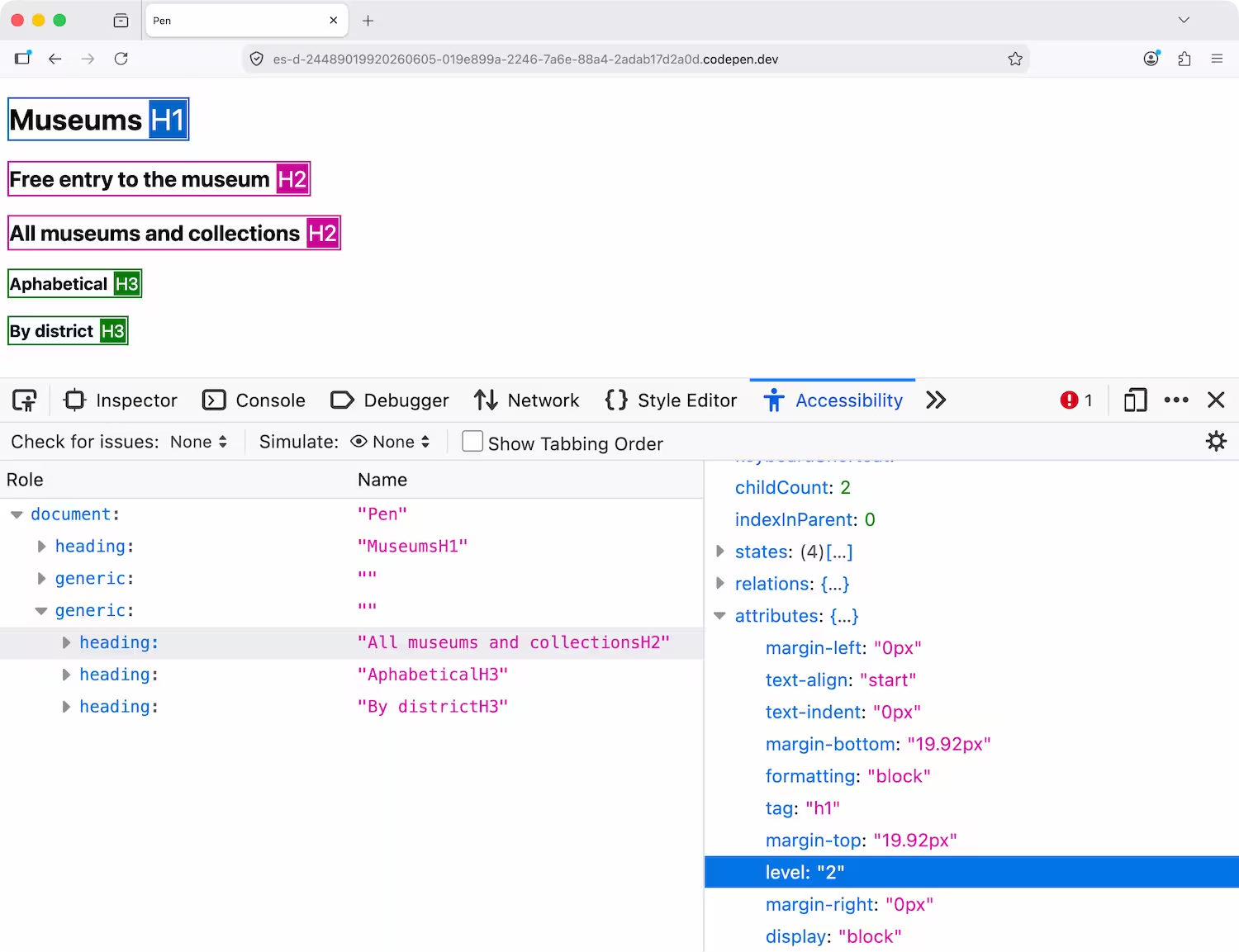
In the accessibility panel in Firefox, you can see that the tag for the “All museums and collections” heading is H1, but the level is 2.
Now that we know how it works, let's do a quick Q&A based on the questions I had when I first saw this.
On a really large page, I would need a bachelor's degree in maths to create the document outline. Is using an h1 for everything really a good idea?
I don't think so.
I've been waiting for this feature for years. I think it's fantastic and super helpful, but the example I showed you is not necessarily the best use case. I probably wouldn't use heading offsets for static HTML documents, because the document is much easier to read if the tag name represents the actual heading level.
It gets really interesting when you don't have immediate access to the headings or control over the page's structure. For example, when you're working with components.
Here's an example of the same structure built with a web component. When we write the markup, we don't see the heading tags because the web component renders them for us.
<the-section heading="Free entry to the museum"></the-section>
<the-section heading="All museums and collections">
    <the-section heading="">
        <div class="cards">
          <h1>Aphabetical</h1> <!-- heading level 3 -->
          <h1>By district</h1> <!-- heading level 3 -->
        </div>
    </the-section>
</the-section>
class Section extends HTMLElement {
static observedAttributes = ["heading"];
attributeChangedCallback(name, oldValue, newValue) {
if (name === 'heading') {
this.shadowRoot.innerHTML = `
<section headingoffset="1">
${newValue != '' ? `<h1>${newValue}</h1>` : ''}
<slot></slot>
</section>
`
}
}
constructor() {
super();
this.attachShadow({ mode: "open" });
}
}
customElements.define("the-section", Section);For the page I showed at the very beginning of this blog post, this would be perfect because we, as developers, have little to no control over how editors will use the components.
Can I opt out of the algorithm for specific headings?
Yes, by using the headingreset attribute on a parent or the heading itself.
<h1>Museums</h1>
<the-section heading="Free entry to the museum"></the-section>
<the-section heading="All museums and collections">
  <the-section heading="">
    <div class="cards" headingreset>
      <h3>Aphabetical</h3> <!-- heading level 3, not affected by the headingoffset -->
      <h3>By district</h3> <!-- heading level 3, not affected by the headingoffset -->
    </div>
  </the-section>
</the-section>
Do I always have to use H1?
No, you can use whatever you want, but in our example, h2s would become h3s.
<h1>Museums</h1>
<section headingoffset="1">
  <h2>Free entry to the museum</h2> <!-- heading level 3 -->
</section>
…
What happens if you set the value to 2?
The h2 becomes an h3 because h1 +2 = h3.
<h1>Museums</h1>
<section headingoffset="2">
  <h1>Free entry to the museum</h1> <!-- heading level 3 -->
</section>
What happens if you set the value to 14?
The h1 turns into a heading level 9. I'm not exactly sure why, but the maximum offset is 8, and if the heading level is greater than 9, it always returns 9.
<h1>Museums</h1>
<section headingoffset="14">
  <h1>Free entry to the museum</h1> <!-- heading level 9 -->
</section>
Can I use a negative number for the offset?
No.
How can I style an H3 when there's no H3 tag?
You can use the headings pseudo-class, which is currently only supported by Firefox Nightly.
:heading(3) {
  color: fuchsia;
}
Do screen readers support it?
I don't think screen readers need to support anything; if the information is correct in the accessibility tree, they'll read the heading levels accordingly. I tested it with VoiceOver and it always announced the correct heading levels.
How's browser support?
This feature is brand new and currently available only in Firefox Nightly, behind a flag. If you want to test it, type about:config into the address bar, proceed to the next step, search for dom.headingoffset.enabled, and enable it.
If you like this feature, then make some noise and encourage other browser vendors to implement it.
Conclusion
Heading offset is a long-awaited feature, and I hope it will soon make its way into other browsers as well. The implementation, as it stands, seems very sensible to me. Thanks, Keith, et al.